Drive adoption with the fastest, easiest way to work with SharePoint / Office 365

Make applications 'SharePoint aware'
Imagine opening SharePoint documents in your favorite application, editing the document and saving your changes directly back to SharePoint. Now you can.
- Open with… in your preferred application
- Open & edit images, save to SharePoint
- Open & edit documents, save to SharePoint

Get focused. Clear SharePoint clutter
Remove SharePoint chaos and deliver a SharePoint focused on you. Access SharePoint locations and content to where you work.
- Favorites locations
- Recent locations
- Solution profiles
Minimize change, enable greater productivity - Make SharePoint a success

Make SharePoint work for you
The SharePoint locations you care about are with you, where you work, every day. This is your Docs Explorer window into SharePoint.
- Persistent navigation always ready (Task tray)
- Document previews
- SharePoint views and filtering

More action, less SharePoint clicks
Click less and work more with SharePoint productivity actions. Access SharePoint locations and content quickly to streamline saving and accessing content.
- Copy as link, open location in browser
- Open item properties in browser
- Create new folders/document sets
Save documents from Windows Explorer to SharePoint
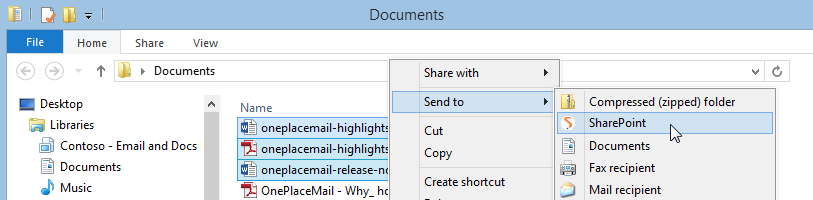
Files located on your local drive, desktop or corporate network drives can be quickly saved to SharePoint. Simply select files in Windows explorer and choose 'Right-Click - Send To SharePoint'.
- Access to favorite and recent locations
- Seamlessly complete SharePoint Metadata
